
Otter Beam / Guides
Otter Beam for teams and enterprise
By Otter Digital Pte. Ltd. · Updated October 2, 2026
Otter Beam for teams connects you, your agents and your teammates in shared projects while your data stays on your own computers or servers. Team features are coming soon, in early November 2026.
Data ownership
Your data stays on your own computers or servers, unless a workload must run on cloud instances. Agents, projects and files live on those machines; devices connect to them directly or through Otter Relay, which forwards the already-encrypted connection and cannot read commands, output or files.
Shared projects and the permission matrix
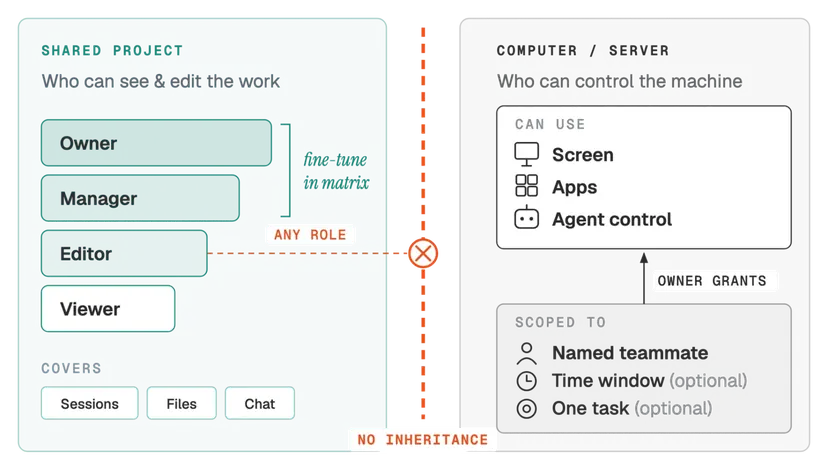
Shared projects bring you, your agents and your teammates into the same chats. Each project has four built-in roles — Viewer, Editor, Manager and Owner — and owners and managers fine-tune each role in the permission matrix.
Computer control, granted separately
Screen, app and agent control on a computer or server are granted separately, never inherited from a project role. Owners grant them to named members, and each grant can expire or be limited to one task.
Available today
Today, Otter Beam lets you reach the AI agents, files and apps on your own computers from any device, with end-to-end encryption and device keys that never leave the device. Read What is an agentic workspace? for the full picture.
Frequently asked questions
When are Otter Beam team features available?
Team features are coming soon, in early November 2026. Today Otter Beam connects your own devices to your own computers; shared projects, roles and separately granted computer control arrive with the team release.
Where is team data stored?
Data stays on your own computers or servers, unless a workload must run on cloud instances. Otter Relay only forwards encrypted connections and cannot read your commands, output or files.
What roles does a shared project have?
A shared project has four built-in roles: Viewer, Editor, Manager and Owner. Owners and managers fine-tune what each role can do in the permission matrix.
Does a project role give access to my computer?
No. Screen, app and agent control on a computer are granted separately and never inherited from a project role. The owner grants them to named members.
Can computer access expire?
Yes. Each grant of computer control can expire after a time window or be limited to one task.
How do I talk to Otter Digital about enterprise use?
Email peter@otterd.com. Otter Beam is built by Otter Digital Pte. Ltd. in Singapore.
Get started
Download Otter Beam for your computer first, then add your phone, tablet or browser. For enterprise questions, write to peter@otterd.com.
Otter Beam is built by Otter Digital Pte. Ltd. and is not affiliated with or endorsed by any AI coding-agent provider.